
Workspace and App Interface
App Settings
To open the app settings, choose Preferences in the main menu  . The menu is available when a document is open.
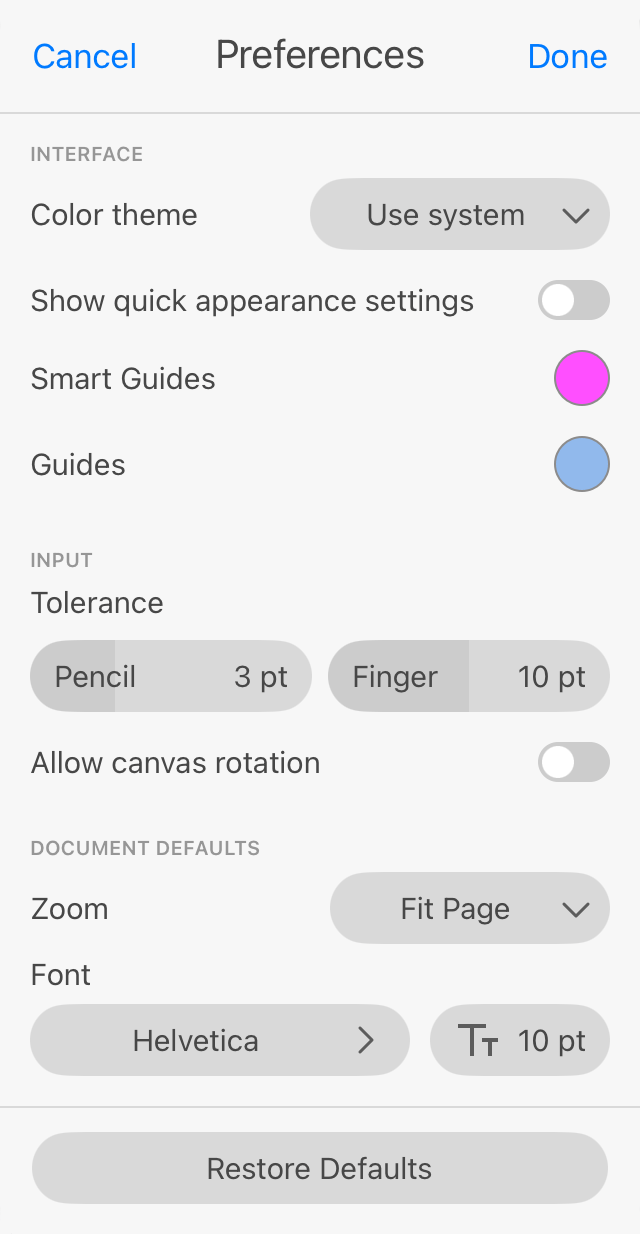
Color theme: Defines the appearance of panels, buttons and other elements of the interface.
Show quick appearance settings: Allows to display appearance settings in the Appearance bar when the Appearance panel is closed.
Smart guides: Defines the color of smart guides that appear for a short time when you move and align objects.
Guides: Defines the color of guide lines.
To set a new color, tap on a color circle and then choose a color from the Color panel.
Tolerance: Sets the tolerance for selection and drawing tools. Greater values make it easier to tap on a path or anchor point in order to select or grab it.
Allow canvas rotation: Allows you to rotate the canvas using the two-finger gesture along with zooming.
Zoom: Sets up the default zoom for new documents.
Font: Sets up the default font family and size for new documents.
Restore Defaults: Restores the default state of the settings.