
Layout
Choosing Paper
The standard document layouts are based on existing media (e.g., label paper or envelopes). Depending on the document type, different options are available. The Document panel is used to select a paper layout.
Desktop Publishing documents let you select a paper format by choosing it from the list in the Document Size section.
For most of the other document types, there is the list of supported papers provided, with a powerful search tool and preview for each layout. To open it, tap the Change Layout button in the Document panel.
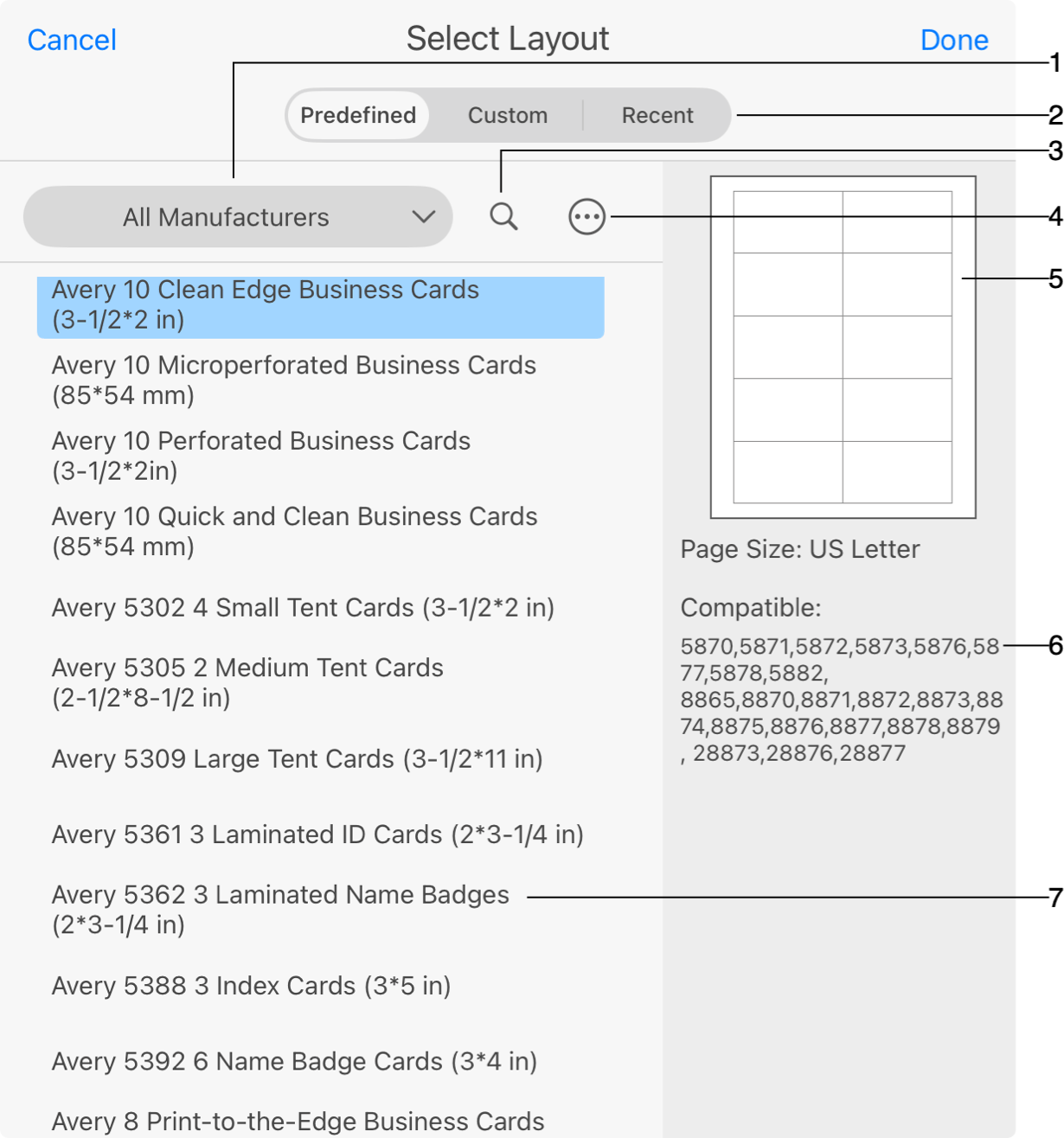
1 - Manufacturer filter.
2 - The Predefined section contains the list of standard paper layouts. Custom is the list of customized paper layouts. Recent lists layouts you recently used.
3 - Search tool.
4 - This button  opens the menu which lets you customize a standard layout.
5 - Paper layout preview.
6 - List of papers compatible with the selected one.
7 - List of paper layouts.
To use a new layout in your document, select it in the list and tap the Done button. If you are looking for products of a particular manufacturer, select it in the popup list.
Layouts for disc related elements may contain different types of elements on the same sheet (e.g., disc label and spline). To select a particular element, tap it in the preview.
To customize a standard paper, select it and tap the Customize command in the menu . Further details can be found in the Custom Layout section.